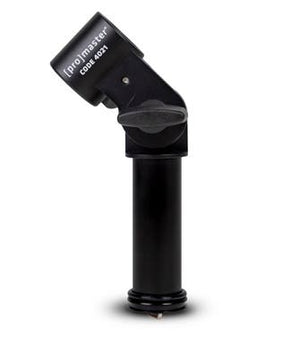
ProMaster XC-M 522 Tilt Adapter - Column
Price Match Guarantee
Seen it cheaper at an authorised Australian retailer? Submit a price match request and we’ll beat it.*
ProMaster XC-M 522 Tilt Adapter - Column is backordered and will ship as soon as it is back in stock.
Australian Manufacturer's Warranty
Australian Manufacturer's Warranty
Shop with confidence. Our products are sourced through authorised Australian suppliers and backed by genuine Australian manufacturer warranties.
Delivery
Delivery
Standard Delivery - $10
3-5 business days
Express Delivery - $15
1–3 business days
View full details on our shipping page.
Returns
Returns
We’re here to help if something isn’t right. While we don’t offer refunds for change of mind, we’re happy to help with an exchange. Your Australian Consumer Law rights always apply.
View our returns policy for full details.
Request a Price Beat

ProMaster XC-M 522 Tilt Adapter - Column
Our price $39.00
Please fill in the details below and we will be in touch shortly.

ProMaster XC-M 522 Tilt Adapter - Column

ProMaster XC-M 522 Tilt Adapter - Column is backordered and will ship as soon as it is back in stock.
At a glance
The ProMaster XC-M 522 Column Tilt Adapter is a column tilt adapter from ProMaster for the XC-M 522.
Description
Description
Key Features
- Reliable
- Useful
- Great Quality
ProMaster XC-M 522 Column Tilt Adapter (4021) expands the capability of your XC-M 522 aluminum or XC-M 522C carbon fiber tripod by giving it's the center column the freedom to tilt 180° (90° up & 90° down). This adapter essentially converts your XC-M's center column into a multi-position, adjustable boom.
Installation
Simply unscrew the weight hook from the center column, loosen the center column twist lock and slide it out of the tripod. You can replace it with the 4021 Column Tilt Adapter, tighten the twist lock, and open the flip-lock on the Column Tilt Adapter.
Insert the center column and close the flip lock. This conversion can easily be done in less than 30 seconds. Once your XC-M 522 has been converted you can reinstall the weight hook to the bottom of the adapter and add weight for more stability.
A second, retractable weight hook is included with this adapter which you can use at the end of the boom (end of the center column) to counterweight your camera.
Operating the Boom
To operate the boom, loosen the main knob on the 4021 Adapter while holding your camera and then tilt the assembly into whatever position you like before tightening the knob. To rotate the boom, loosen the twist lock on the yoke of the tripod and spin the adapter.
To extend or retract the boom using the twist lock on the column to adjust its upper stage. This adapter has a number of teeth machined within its joint to give it an excellent amount of holding power in various tilt positions.
Be sure to tighten its main knob before you release your camera to prevent it from falling. The 4021 Column Tilt Adapter can be installed and used permanently on your XC-M 522 if you so choose because it can achieve the same vertical position as the 'normal' center column when needed.
It's great for macro work, extending your camera over a tabletop or a flowing creek.
Payment & Security
Secure Payments
Shop securely with trusted payment methods. Your payment details are encrypted and securely processed.